
Introduction
This document applies to these appliances:
| Appliance Series | Appliance Models |
|---|---|
| 29000 | 29100, 29200 |
| 19000 | 19100, 19200 |
| LightSpeed Appliances | QLS250, QLS450, QLS650, QLS800MLS200, MLS400 |
| Threat Emulation Appliances | TE2000XN, TE250XN |
| 28000 | 28000, 28600HS |
| 26000 | 26000 |
| 16000 | 16000, 16600HS |
| 9000 | 9100, 9200, 9300, 9400, 9700, 9800 |
| 7000 | 7000 |
| 6000 | 6200, 6400, 6600, 6700, 6900(does not apply to 6500 and 6800) |
| Smart-1 7000 / 700 Appliances | Smart-1 700-S, Smart-1 700-M, Smart-1 7000-L, Smart-1 7000-XL, Smart-1 7000-UL |
The Lights Out Management (LOM) application lets you remotely control Check Point appliances over a dedicated management channel.
This management channel also works when the appliance is turned off or is not responding, if the appliance is connected to a power source.
 | Note – Not all sensors shown in the tutorial are supported in all appliance models. |

LOM Port on an Appliance
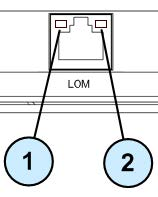
| Item | Description |
|---|---|
| 1 | Link indicator:Off- No LinkOn (Green) – Link is establishedBlink (Green) – Link is active |
| 2 | Activity / Speed indicator:Off – 10Mbps data rate is usedOn (Green) – 100 Mbps data rate is usedOn (Amber) – 1 Gbps data rate is used |
LOM Card WebUI Requirements
To connect to the Lights Out Management (LOM) card’s WebUI, use a supported web browser:
- Microsoft Edge
- Google Chrome
- Mozilla Firefox


